Understanding the World of Artificial Intelligence: A Guide to the Leading AI Systems, Their Strengths, Weaknesses, and Specialties
A practical guide to choosing and using the right AI tools for your specific needs.

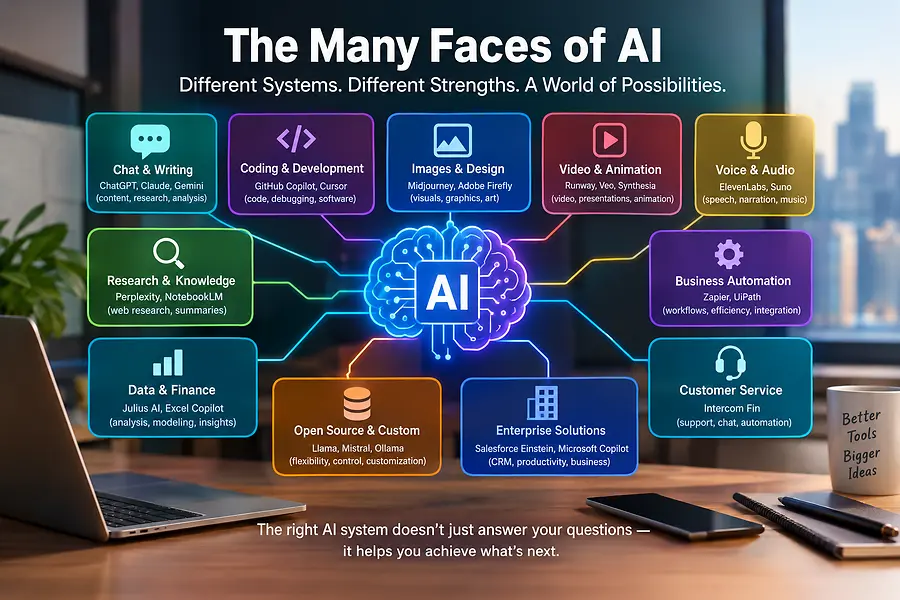
Introduction: One Technology, Many Possibilities
Artificial intelligence (AI) is transforming how we work, communicate, invest, conduct research, create content, and run businesses. What once seemed like technology from a science-fiction movie is now available to individuals, entrepreneurs, investors, educators, and corporations.
However, one of the biggest misconceptions about AI is that every system does the same thing. In reality, different AI platforms are designed for different purposes. Some excel at writing and research; others specialize in programming, financial analysis, image generation, video production, business automation, or working with large amounts of data.
Understanding these differences can help individuals and businesses select the right tools, improve productivity, reduce costs, and make more informed decisions.
The key is not finding one AI system that does everything perfectly. It is learning which system is best suited for the job you need done.
The following guide explores leading AI systems, explains their specialties, and outlines their advantages and limitations. It covers general-purpose assistants, research tools, coding platforms, creative systems, and business applications. This is a practical overview of major systems rather than an exhaustive list of every AI product available.
Part 1: The Major General-Purpose AI Assistants
These systems are designed to help with a broad range of everyday and professional tasks, including writing, brainstorming, research, document analysis, planning, and problem-solving.
1. ChatGPT — OpenAI
Specialty: General-purpose assistance, writing, analysis, brainstorming, research, and creative work.
ChatGPT is a versatile AI assistant that can help users draft emails, write articles, develop business plans, analyze information, explain complex subjects, work with spreadsheets, generate images, and assist with programming.
Pros
- Adaptable to many personal and professional tasks.
- Useful for writing, editing, outlining, and developing ideas.
- Can help analyze uploaded documents and data.
- Supports creative work, image generation, and various productivity workflows.
- Can help users develop and refine ideas through conversation.
Cons
- May occasionally provide inaccurate information or invent details.
- Important financial, legal, and business claims require verification.
- Some capabilities and usage limits depend on the subscription plan.
- Results depend heavily on the quality of the instructions and source information provided.
Best for: Entrepreneurs, investors, real estate professionals, marketers, students, and anyone who wants a flexible AI assistant for multiple types of work.
2. Claude — Anthropic
Specialty: Long-form writing, document analysis, careful reasoning, and software development.
Claude is particularly useful for working with lengthy documents, refining professional writing, reviewing complex information, and assisting with code. It can help turn rough ideas into structured reports, proposals, and business communications.
Pros
- Strong at producing organized, natural-sounding written material.
- Useful for reviewing lengthy documents and comparing information.
- Can assist with complex coding and technical projects.
- Often effective at maintaining a consistent tone throughout a document.
Cons
- May still make factual or reasoning errors.
- Its access to current information depends on available tools and settings.
- Some features and usage allowances require a paid plan.
- It may not integrate as deeply with every business application as ecosystem-specific assistants.
Best for: Professional writers, analysts, consultants, attorneys reviewing nonconfidential materials, and developers working with complex projects.
3. Google Gemini — Google
Specialty: Multimodal AI, research assistance, and integration with Google's ecosystem.
Gemini can work with text, images, and other supported media. Its integration with Google services can make it particularly useful for people who use Gmail, Google Docs, Drive, Sheets, and other Google products.
Pros
- Convenient for users already working within Google's ecosystem.
- Can assist with research, writing, summarization, and analysis.
- Supports multiple types of input, depending on the feature.
- Can help organize information and work across supported Google applications.
Cons
- The quality of answers and integrations can vary by task and account.
- AI-generated research still requires source checking.
- Advanced capabilities may require specific plans or permissions.
- Connected applications introduce additional privacy and access considerations.
Best for: Professionals who rely on Google Workspace, researchers, students, and people who need an assistant integrated with their existing digital workflow.
4. Microsoft Copilot — Microsoft
Specialty: Workplace productivity and assistance within Microsoft applications.
Microsoft Copilot brings AI assistance into supported Microsoft products. Depending on the version and licensing, it can help users draft emails, summarize meetings, create presentations, analyze spreadsheets, and work with business documents.
Pros
- Convenient for people who use Word, Excel, PowerPoint, Outlook, and Teams.
- Can reduce the time spent drafting and summarizing.
- Helps turn information into presentations and business documents.
- Business versions can work with organizational information according to the user's permissions and configuration.
Cons
- Features vary significantly by product, subscription, and organization.
- Some advanced business capabilities can be expensive.
- Spreadsheet calculations, summaries, and generated presentations need review.
- Its greatest advantages may be less noticeable for people who do not use Microsoft applications regularly.
Best for: Corporate teams, office professionals, executives, and businesses that already use Microsoft 365.
5. Perplexity AI
Specialty: Web research, information discovery, and source-supported answers.
Perplexity is designed around answering questions using information retrieved from the web. It commonly presents citations so users can investigate where information came from.
Pros
- Useful for finding information on current topics.
- Provides citations that make it easier to check supporting sources.
- Can help compare companies, products, technologies, and market developments.
- Often saves time during the initial research stage.
Cons
- Citations do not automatically guarantee that a conclusion is correct.
- Sources can be outdated, incomplete, or interpreted incorrectly.
- Research quality depends on the sources retrieved.
- In-depth writing and creative work may benefit from a separate writing assistant.
Best for: Market researchers, investors, journalists, students, and professionals who need to investigate a subject before making a decision.
6. Grok — xAI
Specialty: Conversational AI, current-topic exploration, and social-media context.
Grok is an AI assistant associated with xAI and the X social platform. Depending on its enabled features, it can help users explore current discussions, analyze information, generate content, and answer questions.
Pros
- Can be useful for examining online conversations and emerging topics.
- Supports brainstorming and general-purpose assistance.
- May help identify themes in social-media discussions.
- Offers another perspective when comparing AI-generated answers.
Cons
- Social-media posts may contain rumors, bias, or misinformation.
- Trending discussions are not necessarily representative of public opinion.
- Important claims need confirmation from reliable sources.
- Features and access depend on the product version and subscription.
Best for: Social-media researchers, content creators, marketers, and people monitoring online discussions.
7. Meta AI — Meta
Specialty: Everyday AI assistance and integration with Meta's consumer platforms.
Meta AI is associated with Meta's family of products, including supported experiences within Facebook, Instagram, WhatsApp, and other Meta services. Its capabilities vary by country, application, and rollout.
Pros
- Convenient for users who already spend time in Meta applications.
- Useful for casual questions, brainstorming, and content ideas.
- Can assist with certain creative and image-related tasks.
- May reduce the need to switch between applications.
Cons
- Availability and capabilities vary across products and regions.
- It may not offer the same workflow depth as a dedicated professional tool.
- Users should understand how connected services handle their information.
- Responses still require verification for important decisions.
Best for: Everyday users, social-media creators, and people seeking AI assistance within familiar messaging and social platforms.
8. DeepSeek
Specialty: Reasoning-oriented tasks, mathematics, programming, and cost-conscious AI development.
DeepSeek offers AI models that have attracted attention for their reasoning and coding capabilities, as well as their relevance to developers seeking alternatives to more expensive proprietary systems.
Pros
- Can be useful for programming, technical problem-solving, and mathematics.
- Offers models and access options that may be attractive to developers.
- Some model releases support self-hosting or greater customization.
- Provides an alternative for comparing technical answers from different systems.
Cons
- Results can still contain coding mistakes or faulty reasoning.
- Model capabilities vary between releases and deployment methods.
- Self-hosting requires technical expertise and computing resources.
- Organizations should evaluate data handling, security, and compliance before adopting a hosted or locally deployed version.
Best for: Developers, technical users, researchers, and businesses evaluating AI models for specialized workloads.
9. Mistral AI and Le Chat — Mistral AI
Specialty: Efficient AI models, multilingual tasks, enterprise applications, and customizable deployments.
Mistral AI develops language models and offers Le Chat, an AI assistant. Its model portfolio includes options relevant to organizations that want to customize or deploy AI in different environments.
Pros
- Offers alternatives to the largest proprietary AI providers.
- Certain models can be deployed or customized by organizations.
- Useful for multilingual applications, writing, and development.
- Can be attractive to businesses that need more control over their AI infrastructure.
Cons
- Some deployments require substantial technical expertise.
- Capabilities differ between individual models.
- Organizations may need to build their own interfaces and workflows.
- Open or customizable models still require security, testing, and ongoing maintenance.
Best for: Developers, technology companies, and organizations seeking customizable AI infrastructure.
Part 2: AI Systems Specializing in Research, Knowledge, and Productivity
General-purpose assistants are not the only options. Some AI products focus on specific work environments or specialized tasks.
10. NotebookLM — Google
Specialty: Research and answering questions from supplied source materials.
NotebookLM helps users organize and explore documents and other supported sources. It is useful when you want an AI system to work primarily from a defined collection of information.
Pros
- Helps summarize and compare source documents.
- Useful for studying reports, research materials, and meeting notes.
- Can help users identify themes and develop questions about their sources.
- Makes large collections of information easier to navigate.
Cons
- The quality of its answers depends on the materials supplied.
- It may overlook context or misinterpret a source.
- It is not a substitute for checking original documents.
- Its usefulness is more limited when information outside the supplied sources is needed.
Best for: Researchers, students, analysts, and professionals reviewing multiple reports or documents.
11. Elicit
Specialty: Academic literature searches and evidence synthesis.
Elicit is designed to assist with finding and reviewing research papers. It can help researchers organize evidence and identify what published studies say about a question.
Pros
- Useful for locating relevant academic literature.
- Helps organize information from research papers.
- Can speed up early-stage literature reviews.
- Supports structured comparisons across studies.
Cons
- Relevant studies may be missed.
- Research findings can be misinterpreted without specialist knowledge.
- A paper's presence does not mean its methods or conclusions are reliable.
- It is not a replacement for a complete systematic-review methodology.
Best for: Academic researchers, healthcare researchers, analysts, and evidence-focused professionals.
12. Notebook and Knowledge Assistants Such as Glean
Specialty: Finding information inside company knowledge systems.
Glean is an enterprise-oriented search and knowledge platform that helps employees find information across supported workplace applications.
Pros
- Can make internal documents and organizational knowledge easier to discover.
- May reduce time spent searching multiple business systems.
- Can help employees locate relevant policies and previous work.
- Enterprise permissions can help govern access to information.
Cons
- Results depend on connected systems, indexing, and permissions.
- Outdated internal documents can lead to misleading answers.
- Setup and administration can require significant organizational effort.
- Enterprise deployment may be more than a small business needs.
Best for: Medium-sized and large organizations with information spread across many internal systems.
Part 3: AI Systems for Programming and Software Development
AI is changing software development by helping programmers write code, detect errors, understand unfamiliar projects, and automate parts of the development process.
13. GitHub Copilot
Specialty: Coding assistance inside development environments.
GitHub Copilot helps developers generate code suggestions, explain programming concepts, and assist with software development tasks.
Pros
- Can accelerate repetitive coding.
- Helps developers explore unfamiliar programming languages and libraries.
- Integrates with supported development tools.
- Can assist with tests, documentation, and debugging.
Cons
- Generated code may contain bugs or security vulnerabilities.
- Developers must understand and review what the system produces.
- Suggestions may use outdated patterns or unsuitable dependencies.
- Costs and capabilities vary by plan.
Best for: Software developers, engineering teams, and people learning to program.
14. Cursor
Specialty: AI-assisted software development across codebases.
Cursor is an AI-focused code editor designed to help developers understand, edit, and work across multiple files in a software project.
Pros
- Useful for navigating larger codebases.
- Can help implement changes across related files.
- Supports iterative development through natural-language instructions.
- Can reduce the time needed to understand unfamiliar projects.
Cons
- Large changes can introduce errors in unexpected places.
- Developers still need testing, version control, and code review.
- Results depend on the quality of the project's structure and instructions.
- Some advanced features require paid access.
Best for: Developers building applications, prototypes, websites, and software products.
15. Replit
Specialty: Building, running, and deploying applications in an integrated development environment.
Replit provides a development environment with AI-assisted features that can help users create and test software projects.
Pros
- Makes it easier to start projects without configuring a full local development environment.
- Supports rapid prototyping.
- Can help beginners turn ideas into working software.
- Combines several development activities in one environment.
Cons
- AI-generated applications may have security, reliability, or performance issues.
- Complex production applications still require sound engineering.
- Usage limits, deployment costs, and available features depend on the plan.
- Users need to understand how their application handles data and credentials.
Best for: Beginners, entrepreneurs, and developers building prototypes or web applications.
16. Hugging Face
Specialty: Discovering, sharing, evaluating, and using AI models.
Hugging Face is an AI development ecosystem rather than simply a chatbot. It hosts models, datasets, developer tools, and resources used to build AI applications.
Pros
- Offers access to a broad variety of models and datasets.
- Supports experimentation and comparison.
- Helps developers build customized AI applications.
- Includes many resources for open-source AI development.
Cons
- Requires more technical knowledge than a standard chatbot.
- Model quality and licensing vary.
- Running some models can require expensive hardware.
- Security and data governance must be considered when deploying third-party models.
Best for: AI developers, researchers, engineers, and businesses building their own AI solutions.
Part 4: AI Systems for Images, Graphic Design, and Visual Content
Visual AI systems can generate illustrations, product concepts, marketing materials, artwork, and other images from written instructions or existing references.
17. Midjourney
Specialty: Artistic image generation and visual concept development.
Midjourney is known for generating stylized and visually striking images from text prompts.
Pros
- Useful for creative concepts and visual exploration.
- Can produce distinctive artistic styles.
- Helps generate ideas for branding, campaigns, and editorial illustrations.
- Reduces the time required to explore different visual directions.
Cons
- Exact control over small details can be difficult.
- Text inside images may be incorrect.
- Results may require editing before commercial use.
- Users must review the applicable usage rights and subscription terms.
Best for: Artists, designers, marketers, and content creators who need original visual concepts.
18. Adobe Firefly
Specialty: AI-assisted design and creative production within Adobe's ecosystem.
Adobe Firefly offers generative tools for creating and editing visual content. Its integration with Adobe products can support existing professional design workflows.
Pros
- Useful for editing, expanding, and developing creative assets.
- Fits into supported Adobe design workflows.
- Can help marketers and designers create multiple visual variations.
- Offers a professional creative environment for further editing.
Cons
- Results may need refinement to meet production standards.
- Availability and capabilities differ by product and plan.
- Users must check the licensing terms for the specific features and assets they use.
- Complex compositions can still require traditional design skills.
Best for: Graphic designers, advertising agencies, marketing departments, and businesses already using Adobe tools.
19. Canva Magic Studio
Specialty: Accessible graphic design and marketing materials.
Canva's AI features help users produce and edit presentations, social-media graphics, promotional materials, and other designs.
Pros
- Accessible to people without formal design training.
- Useful for social posts, flyers, presentations, and branded materials.
- Combines templates with AI-assisted content creation.
- Makes it easier to produce consistent marketing assets.
Cons
- Templates and generated designs can look generic without customization.
- Text and layout may need correction.
- Advanced capabilities may require a paid plan.
- Brand consistency still depends on appropriate design choices.
Best for: Small businesses, real estate professionals, entrepreneurs, and social-media marketers.
20. Ideogram
Specialty: Image generation with an emphasis on typography and text within designs.
Ideogram is particularly relevant when a design needs visible words, titles, or poster-style layouts.
Pros
- Useful for advertisements, posters, and concept graphics.
- Can be helpful when text is an important part of an image.
- Supports rapid exploration of different visual styles.
- Reduces the time spent developing initial design concepts.
Cons
- Generated text can still contain errors.
- Fine layout control may require editing.
- Complex brand guidelines may not be followed perfectly.
- Final artwork should be checked before publication.
Best for: Advertisers, marketers, social-media creators, and people creating text-led visual content.
Part 5: AI Systems for Video, Animation, and Presentations
AI video systems can help create promotional videos, explainers, visual stories, training materials, and other video content.
21. Runway
Specialty: AI-assisted video generation and editing.
Runway provides tools for generating and manipulating video and other creative media.
Pros
- Helps creators explore video concepts quickly.
- Can support visual effects and creative editing.
- Useful for advertisements, short films, and experimental content.
- Can reduce the cost of producing certain visual concepts.
Cons
- Motion, object consistency, and fine details can be unpredictable.
- Longer sequences may require considerable editing.
- High-quality output can consume paid credits or computing resources.
- Generated scenes may not match real-world physics or continuity.
Best for: Video creators, advertising teams, filmmakers, and creative agencies.
22. Google Veo
Specialty: Generating video from prompts and other supported inputs.
Veo is Google's video-generation technology, designed to create video content from instructions and supported media.
Pros
- Useful for generating cinematic concepts and short video scenes.
- Can help visualize ideas before a full production.
- May support audio-related capabilities, depending on the version.
- Can speed up the creation of promotional and illustrative content.
Cons
- Results may vary in realism, continuity, and instruction-following.
- Video length and access depend on the available product.
- Generated footage may need professional editing.
- Users should check current availability and commercial-use terms.
Best for: Marketers, filmmakers, and creators producing AI-generated video concepts.
23. Synthesia
Specialty: AI-presenter videos and corporate training content.
Synthesia helps organizations create videos featuring virtual presenters, often using written scripts.
Pros
- Useful for training, onboarding, and instructional content.
- Can reduce the need for repeated filming.
- Makes it easier to update videos when information changes.
- Supports standardized communication across teams.
Cons
- Virtual presenters may feel less natural than human presenters.
- Highly emotional or nuanced performances can be difficult to reproduce.
- Advanced features may require a subscription.
- Organizations must follow applicable consent and avatar-use requirements.
Best for: Corporate training departments, educators, and businesses producing repeatable instructional videos.
24. HeyGen
Specialty: AI avatars, talking-head videos, and multilingual video production.
HeyGen provides tools for generating presenter-style videos and adapting certain video content for different audiences.
Pros
- Useful for marketing, explainers, and business presentations.
- Can help localize content into different languages.
- Reduces the time needed to record repeated presentations.
- Supports rapid creation of video variations.
Cons
- Voice, lip synchronization, and gestures may not always look natural.
- Output quality varies by language and feature.
- Appropriate permissions are essential when using a person's likeness or voice.
- Generated videos should be reviewed for pronunciation and factual accuracy.
Best for: Marketing teams, educators, sales teams, and companies creating multilingual content.
Part 6: AI Systems for Voice, Audio, and Music
AI can also generate narration, synthesize speech, assist with transcription, and create original musical ideas.
25. ElevenLabs
Specialty: AI voice generation, narration, and speech-related applications.
ElevenLabs offers tools for generating natural-sounding speech and other voice-based experiences.
Pros
- Useful for narrating videos, training materials, and presentations.
- Can help create consistent audio for repeated content.
- Supports voice-related applications and multiple languages.
- Can reduce recording time for certain projects.
Cons
- Pronunciation and emotional delivery may require adjustments.
- Synthetic voices can be misused for impersonation.
- Voice cloning requires appropriate permission and safeguards.
- Usage limits and licensing depend on the product and plan.
Best for: Video creators, educators, podcasters, and businesses producing voiceovers.
26. Suno
Specialty: AI-generated songs and music.
Suno helps users create musical compositions from prompts, including songs with vocals in supported modes.
Pros
- Makes music experimentation accessible to non-musicians.
- Can generate ideas for jingles, demos, and creative projects.
- Supports rapid exploration of different genres and moods.
- Reduces the effort required to create an initial musical concept.
Cons
- Fine-grained musical control can be limited.
- Lyrics and arrangements may contain unwanted elements.
- Commercial rights depend on the applicable plan and terms.
- Copyright and ownership questions should be reviewed for the intended use.
Best for: Content creators, musicians exploring ideas, and marketers developing music concepts.
Part 7: AI Systems for Business Automation and Customer Service
Some AI tools go beyond generating answers. They help businesses manage workflows, respond to customers, organize leads, and automate repetitive tasks.
27. Zapier AI
Specialty: Connecting applications and automating workflows.
Zapier connects supported business applications and can automate actions between them. Its AI-related capabilities can help users create or manage certain workflows.
Pros
- Reduces repetitive administrative work.
- Connects many commonly used business applications.
- Can automate tasks such as moving information between systems.
- Often requires less custom programming than building integrations from scratch.
Cons
- Poorly designed workflows can propagate mistakes.
- Some advanced features and higher-volume automation require paid plans.
- Connected systems can create privacy and access risks.
- Important actions need testing, logging, and appropriate approval controls.
Best for: Small businesses, operations teams, sales professionals, and entrepreneurs who want to automate routine processes.
28. Salesforce Einstein
Specialty: AI-assisted customer relationship management and sales workflows.
Salesforce Einstein brings AI capabilities into supported Salesforce products to assist with customer information, sales processes, service, and related business tasks.
Pros
- Can help teams work with customer and sales data.
- Supports productivity within a broader CRM environment.
- Can assist with forecasting, summaries, and workflow-related tasks where enabled.
- Useful for organizations seeking AI within established business processes.
Cons
- Its usefulness depends on data quality and configuration.
- Implementation may be complex.
- Costs can be significant for smaller businesses.
- AI-generated forecasts and recommendations require oversight.
Best for: Sales organizations, customer service teams, and businesses already using Salesforce.
29. Intercom Fin
Specialty: AI-powered customer support.
Fin is an AI customer-service agent designed to answer questions using supported business knowledge and service workflows.
Pros
- Can answer common customer questions quickly.
- May reduce the workload on human support teams.
- Can provide service outside normal staffing hours.
- Helps scale responses to recurring inquiries.
Cons
- Complex or sensitive cases may require human intervention.
- Outdated help articles can produce poor answers.
- Poorly configured automation can frustrate customers.
- Businesses need clear escalation and monitoring procedures.
Best for: Companies with recurring customer questions and established support documentation.
30. UiPath
Specialty: Robotic process automation and enterprise workflow automation.
UiPath focuses on automating repetitive digital tasks and business processes. AI capabilities can help with document processing, decision support, and selected workflow steps.
Pros
- Can automate repetitive processes across supported applications.
- Useful for document-heavy administrative work.
- Helps standardize certain operational workflows.
- Can support large-scale automation programs.
Cons
- Implementation and maintenance can be technically demanding.
- Changes to business applications may break automated workflows.
- Poorly selected processes can deliver little return on investment.
- Sensitive operations require strong testing and human oversight.
Best for: Large organizations, finance departments, back-office operations, and companies with high volumes of repetitive tasks.
Part 8: AI for Data Analysis and Financial Work
AI can help people understand spreadsheets, investigate market information, organize financial data, and build analytical models. However, AI assistance should not be confused with a regulated financial service, a verified investment forecast, or professional financial advice.
31. Julius AI
Specialty: Data analysis and working with spreadsheets.
Julius AI helps users explore datasets, create visualizations, and analyze information using conversational instructions.
Pros
- Makes data exploration more accessible to non-programmers.
- Can help summarize trends and create charts.
- Useful for analyzing structured datasets.
- Can accelerate early-stage analysis and reporting.
Cons
- Incorrect assumptions can produce misleading conclusions.
- Data must be cleaned and checked.
- Complex statistical work still requires appropriate expertise.
- Sensitive financial or customer data should only be uploaded when permitted and appropriately protected.
Best for: Analysts, business owners, researchers, and professionals working with spreadsheets or datasets.
32. Microsoft Excel with Copilot
Specialty: Spreadsheet analysis and productivity within Excel.
Where supported, Copilot can assist with understanding spreadsheet data, developing formulas, summarizing information, and identifying patterns.
Pros
- Fits into familiar spreadsheet workflows.
- Can help users understand formulas and organize reports.
- Useful for routine business and financial analysis.
- May reduce the time spent on repetitive spreadsheet tasks.
Cons
- Generated formulas and calculations can be wrong.
- Results depend on data structure and feature availability.
- Complex financial models need independent validation.
- Users must understand the assumptions behind a calculation.
Best for: Business owners, accountants, analysts, and real estate professionals who work with financial spreadsheets.
33. AlphaSense
Specialty: Financial and business intelligence from professional information sources.
AlphaSense is an AI-powered market intelligence platform designed to help professionals search and analyze company information, filings, research, and other supported sources.
Pros
- Useful for investigating companies and industries.
- Can help professionals find relevant passages in lengthy documents.
- Supports research and competitive intelligence workflows.
- Can help organize information from multiple sources.
Cons
- Access can be expensive compared with general-purpose assistants.
- Research results still need critical evaluation.
- Coverage depends on the platform's available sources and subscriptions.
- It is not a guarantee of investment performance.
Best for: Investment professionals, corporate strategy teams, and business researchers.
34. Bloomberg Terminal AI Capabilities
Specialty: Financial market data and professional investment research.
Bloomberg's professional platform combines market data, news, analytics, and other financial tools, with AI capabilities available in supported products and workflows.
Pros
- Combines financial information with professional research tools.
- Useful for analyzing markets, companies, and economic developments.
- Designed for finance professionals who need specialized data.
- Can help organize research within an established financial workflow.
Cons
- Professional access can be costly.
- AI features vary by product and subscription.
- Market data and analysis must be interpreted carefully.
- It may be excessive for individual investors with simpler needs.
Best for: Institutional investors, analysts, portfolio managers, and financial professionals.
35. ChatGPT and Claude for Financial Modeling
Specialty: Assisting with investment analysis, assumptions, scenario planning, and financial documents.
General-purpose AI systems can help build or review financial models, explain valuation methods, summarize company information, and organize due diligence questions.
Pros
- Can explain financial concepts in plain language.
- Helps structure assumptions and scenario comparisons.
- Can assist with spreadsheet formulas and written investment summaries.
- Useful for drafting due diligence checklists and preliminary analyses.
Cons
- May use incorrect assumptions or produce flawed calculations.
- Cannot guarantee that financial information is complete or current.
- Should not replace independent underwriting or professional review.
- Must not be treated as proof that a transaction or investment is sound.
Best for: Investors, business acquisition teams, real estate professionals, and analysts who want assistance organizing and testing their work.
Part 9: Open-Source and Custom AI Systems
Not every organization wants to rely exclusively on a hosted AI assistant. Some prefer models that can be customized, integrated into their own applications, or deployed on infrastructure they control.
36. Llama — Meta
Specialty: Custom AI applications and models that developers can adapt or deploy under the applicable license.
Llama is a family of AI models from Meta. Depending on the release and license, developers may be able to run models in their own environments or use them as a foundation for customized applications.
Pros
- Offers flexibility for development and experimentation.
- Can support customized assistants and internal tools.
- Some deployment approaches offer greater control over data location.
- Helps organizations explore alternatives to fully hosted AI services.
Cons
- Local deployment can require substantial computing resources.
- The organization must manage security, updates, and performance.
- Licenses and permitted uses vary by model release.
- Running a model locally does not automatically make an application secure.
Best for: Developers, research teams, and businesses that need greater control over model deployment.
37. Ollama
Specialty: Running supported AI models locally on personal computers or servers.
Ollama is a tool that helps users download and run supported models in local environments.
Pros
- Can make local AI experimentation easier.
- Useful for testing models without sending every prompt to a hosted chatbot.
- Supports development of local AI workflows.
- Gives technically capable users more control over their setup.
Cons
- Performance depends on hardware and model size.
- Local models may be less capable than leading hosted systems for some tasks.
- Users must manage model updates, storage, and security.
- Other connected tools may still transmit information externally.
Best for: Technical users, developers, and organizations experimenting with local AI.
38. Private and Enterprise AI Deployments
Specialty: Using AI within an organization's own security, access, and compliance framework.
Businesses can deploy selected AI models through enterprise services or controlled infrastructure. These are implementation approaches rather than a single AI brand.
Pros
- Can support tighter control over access and data handling.
- May integrate with internal applications and business processes.
- Allows organizations to set policies for approved use.
- Can be tailored to industry-specific requirements.
Cons
- Requires careful security design and ongoing maintenance.
- Enterprise deployment can be expensive.
- Privacy depends on actual architecture, contracts, settings, and access controls.
- Organizations remain responsible for compliance and appropriate oversight.
Best for: Companies handling confidential information, regulated workflows, or specialized internal knowledge.
Part 10: How to Choose the Right AI System
The right AI system depends on your objective, budget, existing software, privacy requirements, and how much human review the task needs.
Your primary goal
AI systems worth evaluating
Writing emails, articles, and business documents
ChatGPT, Claude
Current web research and citations
Perplexity, Gemini
Working with Google applications
Gemini
Working with Word, Excel, and PowerPoint
Microsoft Copilot
Reviewing lengthy reports and source materials
Claude, NotebookLM
Programming and software development
Claude, ChatGPT, GitHub Copilot, Cursor
Graphic design and social-media materials
Canva, Adobe Firefly, Midjourney
AI-generated video
Runway, Veo, Synthesia, HeyGen
Voiceovers and narration
ElevenLabs
AI-generated music
Suno
Spreadsheet analysis
Excel with Copilot, Julius AI
Professional market intelligence
AlphaSense, Bloomberg
Business workflow automation
Zapier, UiPath
Customer-service automation
Intercom Fin
Custom or locally deployed models
Llama, Mistral models, Ollama
These are starting points, not universal rankings. Capabilities overlap, and products change frequently. The best choice is the one that performs your actual tasks reliably at an acceptable cost.
Part 11: The Advantages and Risks of Using AI
AI offers important opportunities, but responsible adoption requires understanding its limitations.
The Advantages
1. Greater productivity: AI can help draft documents, summarize information, and reduce repetitive work.
2. Faster research: AI tools can help locate relevant material, organize information, and identify questions for further investigation.
3. Lower barriers to creativity: People without specialized design, coding, or production skills can develop initial concepts and prototypes.
4. Business scalability: Properly designed AI workflows can help organizations handle more information and routine tasks without increasing every administrative expense at the same rate.
5. Better access to expertise: AI can explain unfamiliar concepts and help people prepare more informed questions for qualified professionals.
The Risks
1. Inaccurate answers: AI can confidently present information that is incomplete, outdated, or incorrect.
2. Privacy and confidentiality: Users should not upload sensitive customer information, financial records, contracts, or trade secrets without checking the platform's policies and obtaining any necessary authorization.
3. Bias: Training data and system design can influence the results AI produces.
4. Security: AI-generated code and automated workflows can introduce vulnerabilities if they are not properly tested.
5. Overreliance: AI should support human judgment, not eliminate responsibility for decisions.
6. Intellectual property: Users need to review applicable licensing, copyright, and commercial-use requirements when publishing or selling AI-generated material.
For high-stakes decisions involving investments, lending, contracts, medical care, or legal obligations, AI output should be treated as assistance rather than final authority.
Conclusion: The Future Belongs to People Who Know How to Use AI
Artificial intelligence is not one system competing to perform every possible task. It is an expanding ecosystem of models, applications, and specialized tools.
ChatGPT and Claude can help with writing and analysis. Gemini and Microsoft Copilot can fit into established productivity ecosystems. Perplexity can accelerate web research. Midjourney and Adobe Firefly support visual creativity. Runway and Veo focus on video generation. GitHub Copilot and Cursor assist software developers. Other systems specialize in research, audio, financial intelligence, customer service, and business automation.
The real opportunity is learning how to combine the right tools.
A business might use one AI assistant to develop a strategy, another to investigate the market, a specialized tool to create marketing materials, and an automation platform to handle repetitive tasks. Each system serves a purpose, while human judgment remains essential for checking the work and making the final decision.
AI literacy is becoming an important professional skill. Understanding what different systems can do, where they fall short, and how to use them responsibly can help individuals and businesses make better use of this rapidly developing technology.
The goal is not to use AI simply because it is available. The goal is to use it strategically—to save time, improve the quality of work, support sound decisions, and create opportunities that might otherwise have been out of reach.

Gladys Yarbrough is CEO of KD Bar Investments and Private Money Lending Manager at Blue Horizon Capital Group. With over two years in real estate and private lending, she specializes in helping distressed homeowners and structuring profitable transactions. Certified Project Money Lender with cosmetology and business education, Gladys received Outstanding Leader of the Year Award for 4-H mentorship. She excels at…